Laser Dots: A Bold Font for Business
It was a busy morning at the bakery, and I was finalizing the new packaging design for their signature almond croissants. The labels needed to feel fresh, modern, and professional. That’s when I remembered Laser Dots—a display font that had been on my radar for a while. It turned out to be the perfect fit.
What Is Laser Dots?
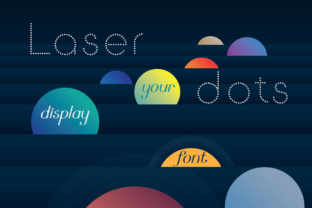
Laser Dots is a dotted sans serif-based display font. Its unique style features small, evenly spaced dots that give it a playful yet polished look. The font has a clean, geometric structure that makes it versatile for a range of business applications. It’s not just a font; it’s a visual statement that can elevate any brand’s identity.
The personality of Laser Dots is friendly and approachable, but it also carries an air of sophistication. It works well in both casual and more formal settings, making it a great choice for businesses that want to balance creativity with professionalism.
Real-World Use Cases
One of the first places I used Laser Dots was on a candle seller’s label. The font added a subtle, elegant touch that made the product stand out on the shelf. It worked especially well for the product name, giving it a clear and memorable presence without overwhelming the design.
Another example was a café updating its menu. Using Laser Dots for the headings gave the menu a cohesive, modern feel. It paired beautifully with a simple, clean sans serif for the body text, creating a balanced and easy-to-read layout.
I also tested it on a skincare label. The dots created a soft, eye-catching effect that complemented the product’s natural theme. It felt like the font was speaking to the customer, inviting them to explore what was inside.
When to Use Laser Dots
Laser Dots shines in headlines, logos, and short phrases. It’s ideal for display text where visibility and impact matter most. For instance, using it on a boutique tag or a handmade product label can make the brand feel more intentional and curated.
It’s less suited for long paragraphs, but as a decorative accent or for titles, it adds a nice contrast to more traditional fonts. It’s also great for social media graphics, where bold and eye-catching text can help grab attention quickly.
For small labels or mobile screens, it’s important to test the font at different sizes. Laser Dots maintains clarity even at smaller sizes, making it a reliable choice for product tags, stickers, and digital ads.
Font Pairing Ideas
Pairing Laser Dots with other fonts can enhance its visual appeal. A clean sans serif like Helvetica or Montserrat can provide a strong foundation for body text, letting Laser Dots take center stage for headlines and titles.
An elegant serif font like Georgia or Playfair Display can add a touch of refinement, especially for more upscale brands. A script or handwritten font might work well for a more personal or artisanal feel, but it’s best to use these sparingly to avoid clutter.
For a modern look, pairing Laser Dots with a minimalist sans serif can create a sleek and contemporary aesthetic. This combination works well for online shops, website banners, and digital ads.
Considerations Before Using Laser Dots
Before applying Laser Dots to your branding materials, check the available styles, weights, and file formats. Some fonts come with multiple variations, including regular, bold, and italic, which can offer more flexibility in design projects.
Also, consider the multilingual support if your business serves international customers. Make sure the font includes the necessary characters for your target languages. And don’t forget about commercial licensing—ensure you have the right to use the font for your specific business needs, whether it’s for product packaging, merchandise, or client work.
Overall, Laser Dots is a premium display font that brings a fresh and modern vibe to any brand. It’s a great tool for small businesses looking to create a consistent and memorable visual identity.